Tutorial on matching#
This notebook will demostrate how to match catalogs with this package.
Data I/O#
In this package, data are handled by the pyttop.table.Data class. Intuitively (though not accurately), a ‘class’ is a type of objects that can store information and perform certain operations. As we will see later, we can initialize an pyttop.table.Data object, which can store a data table (in the memory) and allows you to do operations including matching, merging and more.
To get started, import the pyttop.table.Data class:
from pyttop.table import Data
Reading and writing Table-like data#
The data table of an pyttop.table.Data object is stored in an astropy.table.Table object, so you can load anything that can be converted to an astropy.table.Table. For introduction to tables and documentations on the astropy.table.Table, see Astropy’s documentation on Data Tables, especially the supported formats of Astropy’s Built-In Table Readers/Writers.
The most straightforward way to load a table is to initialize a Data object with the path to the data file (note that the files in ./samples/ directory are randomly generated datasets):
cat1 = Data('samples/catalog1.csv', name='cat1') # cat1 is an astropy.table.Table object
It is highly recommended to input a name keyword argument, as this name will be used to distinguish different datasets. If Data is initialized with a path to file and no name is given, it will be automatically set to the file name.
The astropy.table.Table object used to store the table can be accessed with data.t. Thus, you can do anything as you can do with an astropy.table.Table object.
print("Name:", cat1.name)
cat1.t # an astropy.table.Table
Name: cat1
| survey1_id | RA | Dec | A | B |
|---|---|---|---|---|
| int64 | float64 | float64 | int64 | int64 |
| 0 | 134.8344427850505 | -87.17137328819392 | 1648 | 312 |
| 1 | 342.2571503075698 | -32.72306298625976 | 5539 | 35 |
| 2 | 263.51781905210584 | -61.7079617031306 | 9637 | 172 |
| 3 | 215.5170543109332 | -44.22863779517675 | 4199 | 19 |
| 4 | 56.16671055927715 | -8.319017346651634 | 8445 | 320 |
| 5 | 56.158027321032954 | -67.56369937660125 | 2557 | 263 |
| 6 | 20.910100380551807 | -53.06553692679332 | 5592 | 493 |
| 7 | 311.82341247897665 | -22.000397531125614 | 98 | 399 |
| 8 | 216.40140422755516 | -69.40816510575398 | 2200 | 141 |
| ... | ... | ... | ... | ... |
| 90 | 43.053928537788615 | -81.62075089746907 | 5596 | 47 |
| 91 | 256.7681234002782 | -9.250581784200591 | 5801 | 88 |
| 92 | 273.88261750208306 | -8.962374855300254 | 2806 | 487 |
| 93 | 202.05979112501865 | -33.020868845405886 | 537 | 236 |
| 94 | 277.54818478364194 | -59.48731880561694 | 5986 | 372 |
| 95 | 177.76641469118067 | -58.571138284860524 | 1841 | 384 |
| 96 | 188.18381857751785 | -24.66398890167845 | 8716 | 271 |
| 97 | 153.91476660907787 | -9.260076604268065 | 6971 | 188 |
| 98 | 9.150885627874267 | -10.162221816139436 | 5625 | 486 |
| 99 | 38.8409137175896 | -19.811200872813856 | 2950 | 191 |
You may also add keyword arguments to be passed to astropy.table.Table.read():
cat3id = Data('samples/catalog3_id.txt', name='cat3id',
              names=['cat3ID', 'survey2_id'], format='ascii') # 'ascii' is one of the supported formats of Astropy's Built-In Table Readers/Writers.
cat3v = Data('samples/catalog3_measurement.txt', name='cat3v',
             names=['survey2_id', 'x', 'y', 'class1'], format='ascii')
A Data object can also be created with an astropy.table.Table object, or anything that can be converted to an astropy.table.Table object.
from astropy.table import Table
cat2_table = Table.read('samples/catalog2.fits')
cat2 = Data(cat2_table, name='cat2')
cat4_dict = dict(Table.read('samples/catalog4.hdf5'))
# print(cat4_dict)
cat4 = Data(cat4_dict, name='cat4')
You can save the table to files with Astropy’s table writers (see Astropy’s documentation on Reading and Writing Table Objects):
# cat1.t.write(filename, format=supported_format)
Reading and writing an pyttop.table.Data object#
Though you can write the table with the astropy’s writers (as shown above), it is more recommended to use the save() method of the pyttop.table.Data object itself (note that it is different from cat1.t.write()). This method not only saves the data table, but also saves other key properties of the data (e.g. the user-defined row subsets) of an pyttop.table.Data object.
cat1.save('samples/output/cat1', overwrite=True) # set overwrite=True to overwrite an existing file
The data is saved to 'samples/output/cat1.data'.
Note that the data’s matching with other data is not saved. If you want to match the data (say cat1) with other datasets (say cat4), you have to merge the datasets into one dataset (say merged_cat), and save the merged dataset (merged_cat). If you save cat1 to a “.data” file and load it later, you are unable to recover the match between cat1 and cat4.
To load a “.data” file and (mostly) recover cat1, the pyttop.table.Data object:
cat1 = Data.load('samples/output/cat1.data')
Matching#
In this package, catalog B is said to be matched to A, if each record (row) in A is assigned two values:
Whether it can be matched to a record in catalog B;
The index of the best match record in catalog B (if no match possible, the index can be any number but means nothing).
A is referred to as the base data of the match.
Matching with a built-in matcher#
To match cat4 to cat1 with the exact value of the 'survey1_id' field in cat1 and the 'survey1_id' field in cat4, use an ExactMatcher:
from pyttop.matcher import ExactMatcher
cat1.match(cat4, ExactMatcher('survey1_id', 'survey1_id'))
[match] "cat4" matched to "cat1": 56/100 matched.
<Data 'cat1'>
Since there are more than one records for the same 'survey1_id' in cat4, matching cat1 to cat4 is not equal to matching cat4 to cat1:
cat4.match(cat1, ExactMatcher('survey1_id', 'survey1_id'))
[match] "cat1" matched to "cat4": 70/70 matched.
<Data 'cat4'>
You may use any iterable object (e.g. an array) to match the catalogs, provided that what is used to match catalogs has the same length (i.e. number of records) as the catalogs.
print('len(cat3v) =', len(cat3v))
print('len(cat3id) =', len(cat3id))
cat2.match(cat3v, ExactMatcher('survey2_id', cat3id.t['survey2_id']))
len(cat3v) = 110
len(cat3id) = 110
[match] "cat3v" matched to "cat2": 110/150 matched.
<Data 'cat2'>
You can also match data with thier coordinates:
from pyttop.matcher import SkyMatcher
import astropy.units as u
cat1.match(cat2, SkyMatcher(unit=u.deg, unit1=(u.h, u.deg))) # RA for cat1 is dms; RA for cat2 is hms.
[SkyMatcher] Data cat1: found RA name 'RA' and Dec name 'Dec'.
[SkyMatcher] Data cat2: found RA name 'RA' and Dec name 'Dec'.
[match] "cat2" matched to "cat1": 90/100 matched.
<Data 'cat1'>
For more information on SkyMatcher, use help(SkyMatcher).
To remove all matches to cat1, use:
# cat1.reset_match()
To unmatch cat2 from cat1:
cat1.unmatch(cat2)
[match] "cat2" unmatched to "cat1".
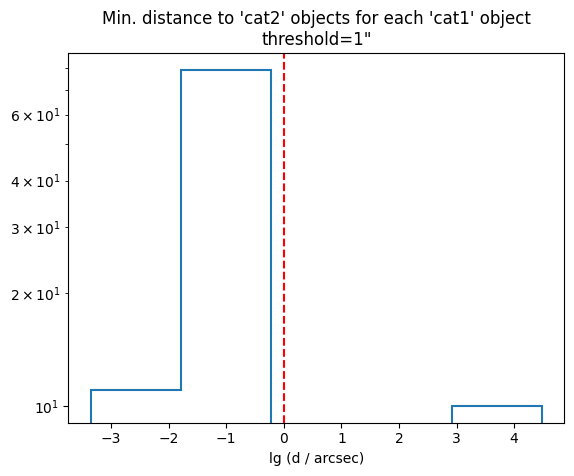
For SkyMatcher, you can also explore the distribution of minimum sky distances, i.e. the distance to the nearest object in cat2 for each object in cat1:
skymatcher = SkyMatcher(unit=u.deg, unit1=(u.h, u.deg))
skymatcher.explore(cat1, cat2)
cat1.match(cat2, skymatcher)
[SkyMatcher] Data cat1: found RA name 'RA' and Dec name 'Dec'.
[SkyMatcher] Data cat2: found RA name 'RA' and Dec name 'Dec'.
[match] "cat2" matched to "cat1": 90/100 matched.
<Data 'cat1'>
Defining custom matchers#
Note: This part is for advanced users. If you are new to this package, you may skip this part for now.
You may also define your own matchers. A macther class should be defined like this:
class MyMatcher():
    def __init__(self, args): # 'args' means any number of arguments that you need
        # initialize it with args you need
        pass

    def get_values(self, data, data1, verbose=True): # data1 is matched to data
        # prepare the data that is needed to do the matching (if necessary)
        pass

    def match(self):
        # do the matching process and calculate:
        # idx : array of shape (len(data), ).
        #     the index of a record in data1 that best matches the records in data
        # matched : boolean array of shape (len(data), ).
        #     whether the records in data can be matched to those in data1.
        return idx, matched
Merging catalogs#
Match tree#
If B is matched to A, I call A as the child data of B, and B as the parent data of A.
Say B, C are matched to A, and D is matched to B. Then B, C are children of A, and D is child of B. When we try to merge everything into A (i.e. merge the information in A’s chilren, grandchildren, etc. into A), it may be useful to see all of its children/grandchildren, or what I call the match tree:
cat1.match_tree(detail=False)
Names with parentheses are already matched, thus they are not expanded and will be ignored when merging.
---------------
cat1
:   cat4
:   :   (cat1)
:   cat2
:   :   cat3v
---------------
From the match tree we may see that cat4 and cat2 are matched to cat1 and cat3v is matched to cat2. Although cat1 is also matched to cat4, this match is a duplication in this match tree, and will be ignored when merging everything (cat4, cat2 and cat3v) into cat1.
For more information on how they are matched:
cat1.match_tree(detail=True)
Names with parentheses are already matched, thus they are not expanded and will be ignored when merging.
---------------
cat1 [base]
:   cat4 [ExactMatcher("survey1_id", "survey1_id")]
:   :   (cat1) [ExactMatcher("survey1_id", "survey1_id")]
:   cat2 [<SkyMatcher with thres=1>]
:   :   cat3v [ExactMatcher("survey2_id", "survey2_id")]
---------------
For example, we may also use cat4 as the base catalog:
cat4.match_tree(detail=False)
Names with parentheses are already matched, thus they are not expanded and will be ignored when merging.
---------------
cat4
:   cat1
:   :   (cat4)
:   :   cat2
:   :   :   cat3v
---------------
Catalog merging#
Now we can merge everything possible to be merged into cat1:
merged_cat = cat1.merge(outname='my_merged_catalog')
print("Name:", merged_cat.name)
merged_cat.t
Names with parentheses are already matched, thus they are not expanded and will be ignored when merging.
---------------
cat1
:   cat4
:   :   (cat1)
:   cat2
:   :   cat3v
---------------
[merge] merged: cat1, cat4, cat2, cat3v
Name: my_merged_catalog
| survey1_id_cat1 | RA_cat1 | Dec_cat1 | A | B | id | survey1_id_cat4 | i | j | survey2_id_cat2 | RA_cat2 | Dec_cat2 | a | b | survey2_id_cat3v | x | y | class1 |
|---|---|---|---|---|---|---|---|---|---|---|---|---|---|---|---|---|---|
| int64 | float64 | float64 | int64 | int64 | int32 | int32 | int32 | int32 | int32 | float64 | float64 | int32 | int32 | int64 | int64 | int64 | str8 |
| 0 | 134.8344427850505 | -87.17137328819392 | 1648 | 312 | 61 | 0 | 4612 | 3147 | 94 | 8.98895958611857 | -87.17137328819392 | 3191 | 50 | 94 | 671 | 583 | Type II |
| 1 | 342.2571503075698 | -32.72306298625976 | 5539 | 35 | 34 | 1 | 2740 | 488 | 90 | 22.817134875833332 | -32.72306298625976 | 5383 | 38 | 90 | 288 | 458 | Type II |
| 2 | 263.51781905210584 | -61.7079617031306 | 9637 | 172 | 8 | 2 | 3568 | 6944 | 103 | 17.56785302820989 | -61.7079617031306 | 943 | 16 | 103 | 523 | 685 | Type II |
| 7 | 311.82341247897665 | -22.000397531125614 | 98 | 399 | 64 | 7 | 5238 | 2190 | 101 | 20.78823016812825 | -22.000397531125614 | 5005 | 48 | 101 | 223 | 116 | Type III |
| 9 | 254.90612800657638 | -83.07180811540863 | 2961 | 459 | 52 | 9 | 891 | 5450 | 113 | 16.993742542070294 | -83.07180811540863 | 1308 | 7 | 113 | 515 | 659 | Type II |
| 11 | 349.16754677831796 | -75.4900841471396 | 4433 | 470 | 7 | 11 | 6116 | 6083 | 53 | 23.277828530405216 | -75.4900841471396 | 3495 | 28 | 53 | 674 | 272 | Type III |
| 16 | 109.52720746543358 | -17.669513079079692 | 6944 | 287 | 36 | 16 | 1239 | 1347 | 83 | 7.3018168152337175 | -17.669513079079692 | 2490 | 16 | 83 | 569 | 462 | Type III |
| 19 | 104.8424904712951 | -41.459198227591436 | 4911 | 341 | 63 | 19 | 1198 | 4806 | 104 | 6.989499173053064 | -41.459198227591436 | 4425 | 73 | 104 | 556 | 785 | Type III |
| 20 | 220.2670421000566 | -17.33038603523437 | 3987 | 50 | 11 | 20 | 2203 | 5406 | 78 | 14.68447580405005 | -17.33038603523437 | 3079 | 25 | 78 | 473 | 165 | Type I |
| ... | ... | ... | ... | ... | ... | ... | ... | ... | ... | ... | ... | ... | ... | ... | ... | ... | ... |
| 69 | 355.2792971761862 | -36.81963511305824 | 8319 | 91 | 35 | 69 | 2289 | 7114 | 46 | 23.685285687773018 | -36.81963511305824 | 2079 | 1 | 46 | 257 | 590 | Type II |
| 77 | 26.65607462427253 | -55.193818832951635 | 3863 | 278 | 23 | 77 | 281 | 574 | 110 | 1.7770800016118025 | -55.193818832951635 | 3452 | 79 | 110 | 221 | 394 | Type II |
| 78 | 129.04766227593814 | -5.694301013693888 | 7455 | 126 | 0 | 78 | 7029 | 6887 | 42 | 8.603179857588493 | -5.694301013693888 | 2482 | 91 | 42 | 195 | 720 | Type III |
| 79 | 41.7128614290467 | -77.6231150268606 | 4014 | 392 | 55 | 79 | 9556 | 821 | 0 | 2.780858910895596 | -77.6231150268606 | 474 | 65 | 0 | 39 | 488 | Type II |
| 83 | 22.88100610296851 | -11.039458195711703 | 154 | 121 | 33 | 83 | 8467 | 3230 | 96 | 1.5254003596640098 | -11.039458195711703 | 3983 | 97 | 96 | 570 | 83 | Type III |
| 86 | 262.6582242017031 | -16.45000198189058 | 8096 | 289 | 19 | 86 | 3953 | 3291 | 43 | 17.510545262394547 | -16.45000198189058 | 951 | 61 | 43 | 39 | 21 | Type II |
| 88 | 319.39658732747756 | -42.33144794795942 | 7343 | 125 | 32 | 88 | 4585 | 6732 | 75 | 21.293101039889653 | -42.33144794795942 | 1823 | 61 | 75 | 680 | 773 | Type II |
| 93 | 202.05979112501865 | -33.020868845405886 | 537 | 236 | 18 | 93 | 1939 | 3673 | 136 | 13.470648167799785 | -33.020868845405886 | 5399 | 25 | 136 | 241 | 788 | Type I |
| 98 | 9.150885627874267 | -10.162221816139436 | 5625 | 486 | 14 | 98 | 1925 | 3124 | 81 | 0.6100575664012837 | -10.162221816139436 | 2806 | 72 | 81 | 413 | 520 | Type III |
| 99 | 38.8409137175896 | -19.811200872813856 | 2950 | 191 | 17 | 99 | 956 | 2408 | 69 | 2.589396089660706 | -19.811200872813856 | 4873 | 32 | 69 | 277 | 716 | Type II |
Note that columns with the same names are renamed by the name of the Data objects. You may also check that the match is indeed correct.
We may now save the merged catalog for later use:
merged_cat.save('samples/output/merged_cat', overwrite=True) # you don't need overwrite=True if file 'samples/output/merged_cat.data' does not exist
# load with:
# merged_cat = Data.load('samples/output/merged_cat.data')
Source of a column#
Sometimes we forget the name of the data from which a column is merged. For example, we are sure that the column named 'A' is merged from somewhere, but cannot recall the name of that dataset. We can use the from_which() method:
merged_cat.from_which('A')
'cat1 (samples/catalog1.csv)'
The column 'A' indeed comes from cat1, which is loaded from "samples/catalog1.csv".
WARNING. The from_which() method has several limitations:
In some cases, the software cannot decide the source of the column, and
from_which()will return an empty string.Direct operations on the data table (
astropy.table.Table), especially adding columns to the data table using the values of other columns, can result in incorrect results offrom_which(). For example, instead of:
# WRONG:
merged_cat.t['A+i (wrong)'] = merged_cat.t['A'] + merged_cat.t['i'] # adding a new column
merged_cat.from_which('A+i (wrong)') # wrong result
'cat1 (samples/catalog1.csv)'
use:
# CORRECT:
merged_cat['A+i (right)'] = merged_cat['A'] + merged_cat['i'] # adding a new column
merged_cat.from_which('A+i (right)') # right result: this column is added by the user
'user-added (set by user)'
Merging options#
Maybe you want to keep records that cannot be matched to cat3v and only want to merge subsets of columns from the catalogs:
merge_columns = { # specify columns to be merged
    'cat1': ['survey1_id', 'RA', 'Dec'],
    'cat4': ['i', 'j'],
    'cat2': ['survey2_id'],
    'cat3v': ['class1'],
    }

keep_unmatched = ['cat3v'] # keep records that cannot be matched to cat3v

another_merged_cat = cat1.merge(keep_unmatched=keep_unmatched,
                                merge_columns=merge_columns) # use default outname
print("Name:", another_merged_cat.name)
another_merged_cat.t
Names with parentheses are already matched, thus they are not expanded and will be ignored when merging.
---------------
cat1
:   cat4
:   :   (cat1)
:   cat2
:   :   cat3v
---------------
[merge] entries with no match for cat3v is kept.
[merge] merged: cat1, cat4, cat2, cat3v
Name: (cat1).MATCH(cat4, cat2, cat3v)
| survey1_id | RA | Dec | i | j | survey2_id | class1 |
|---|---|---|---|---|---|---|
| int64 | float64 | float64 | int32 | int32 | int32 | str8 |
| 0 | 134.8344427850505 | -87.17137328819392 | 4612 | 3147 | 94 | Type II |
| 1 | 342.2571503075698 | -32.72306298625976 | 2740 | 488 | 90 | Type II |
| 2 | 263.51781905210584 | -61.7079617031306 | 3568 | 6944 | 103 | Type II |
| 4 | 56.16671055927715 | -8.319017346651634 | 5342 | 1667 | 122 | -- |
| 5 | 56.158027321032954 | -67.56369937660125 | 3192 | 986 | 92 | -- |
| 7 | 311.82341247897665 | -22.000397531125614 | 5238 | 2190 | 101 | Type III |
| 9 | 254.90612800657638 | -83.07180811540863 | 891 | 5450 | 113 | Type II |
| 10 | 7.410417946488881 | -63.922369237760876 | 1969 | 1388 | 14 | -- |
| 11 | 349.16754677831796 | -75.4900841471396 | 6116 | 6083 | 53 | Type III |
| ... | ... | ... | ... | ... | ... | ... |
| 77 | 26.65607462427253 | -55.193818832951635 | 281 | 574 | 110 | Type II |
| 78 | 129.04766227593814 | -5.694301013693888 | 7029 | 6887 | 42 | Type III |
| 79 | 41.7128614290467 | -77.6231150268606 | 9556 | 821 | 0 | Type II |
| 83 | 22.88100610296851 | -11.039458195711703 | 8467 | 3230 | 96 | Type III |
| 86 | 262.6582242017031 | -16.45000198189058 | 3953 | 3291 | 43 | Type II |
| 88 | 319.39658732747756 | -42.33144794795942 | 4585 | 6732 | 75 | Type II |
| 93 | 202.05979112501865 | -33.020868845405886 | 1939 | 3673 | 136 | Type I |
| 96 | 188.18381857751785 | -24.66398890167845 | 1742 | 5773 | 17 | -- |
| 98 | 9.150885627874267 | -10.162221816139436 | 1925 | 3124 | 81 | Type III |
| 99 | 38.8409137175896 | -19.811200872813856 | 956 | 2408 | 69 | Type II |
You can also specify the columns to be ignored during merging (the ignore_columns argument of merge()); see help(Data.merge) for details.
You may also set the depth for match_tree and merge methods. Setting depth to 0 means only keeping the base catalog itself.
cat4.match_tree(depth=2)
Names with parentheses are already matched, thus they are not expanded and will be ignored when merging.
---------------
cat4 [base]
:   cat1 [ExactMatcher("survey1_id", "survey1_id")]
:   :   (cat4) [ExactMatcher("survey1_id", "survey1_id")]
:   :   cat2 [<SkyMatcher with thres=1>]
---------------
cat4.match_tree(depth=0)
Names with parentheses are already matched, thus they are not expanded and will be ignored when merging.
---------------
cat4 [base]
---------------
cat4.merge(depth=1).t
Names with parentheses are already matched, thus they are not expanded and will be ignored when merging.
---------------
cat4
:   cat1
---------------
[merge] merged: cat4, cat1
| id | survey1_id_cat4 | i | j | survey1_id_cat1 | RA | Dec | A | B |
|---|---|---|---|---|---|---|---|---|
| int32 | int32 | int32 | int32 | int64 | float64 | float64 | int64 | int64 |
| 0 | 78 | 7029 | 6887 | 78 | 129.04766227593814 | -5.694301013693888 | 7455 | 126 |
| 1 | 33 | 6099 | 3952 | 33 | 341.59879341119995 | -59.614634573673484 | 3436 | 325 |
| 2 | 35 | 9499 | 4683 | 35 | 291.023045321926 | -60.911736118132026 | 5895 | 53 |
| 3 | 5 | 3192 | 986 | 5 | 56.158027321032954 | -67.56369937660125 | 2557 | 263 |
| 4 | 38 | 3178 | 1863 | 38 | 246.32388954437647 | -57.273335785863544 | 4893 | 100 |
| 5 | 41 | 6052 | 4440 | 41 | 178.26368764005727 | -67.33959337571723 | 5600 | 52 |
| 6 | 57 | 2734 | 4909 | 57 | 70.55383047089227 | -21.45423462041542 | 606 | 307 |
| 7 | 11 | 6116 | 6083 | 11 | 349.16754677831796 | -75.4900841471396 | 4433 | 470 |
| 8 | 2 | 3568 | 6944 | 2 | 263.51781905210584 | -61.7079617031306 | 9637 | 172 |
| ... | ... | ... | ... | ... | ... | ... | ... | ... |
| 60 | 93 | 7519 | 7232 | 93 | 202.05979112501865 | -33.020868845405886 | 537 | 236 |
| 61 | 0 | 4612 | 3147 | 0 | 134.8344427850505 | -87.17137328819392 | 1648 | 312 |
| 62 | 4 | 9710 | 4089 | 4 | 56.16671055927715 | -8.319017346651634 | 8445 | 320 |
| 63 | 19 | 1198 | 4806 | 19 | 104.8424904712951 | -41.459198227591436 | 4911 | 341 |
| 64 | 7 | 5238 | 2190 | 7 | 311.82341247897665 | -22.000397531125614 | 98 | 399 |
| 65 | 42 | 6089 | 916 | 42 | 12.379867601478622 | -45.24763446968531 | 7996 | 59 |
| 66 | 75 | 6257 | 3986 | 75 | 262.4425804947554 | -74.30702138955077 | 1895 | 116 |
| 67 | 0 | 7705 | 2875 | 0 | 134.8344427850505 | -87.17137328819392 | 1648 | 312 |
| 68 | 56 | 3719 | 6748 | 56 | 31.85730073869102 | -29.50780073347093 | 301 | 423 |
| 69 | 63 | 302 | 5592 | 63 | 128.43119760969213 | -41.78027843327174 | 980 | 157 |
Things to be noted#
This package does not support matching multiple records to a single record in the base data. For example, table2 below has two records with the same survey_id:
table1 = Data({'survey_id': [0, 1, 2], 'value': ['A', 'B', 'C']}, name='t1')
table1.t
| survey_id | value |
|---|---|
| int64 | str1 |
| 0 | A |
| 1 | B |
| 2 | C |
table2 = Data({'table2_id': [0, 1, 2], 'survey_id': [0, 1, 0]}, name='t2')
table2.t
| table2_id | survey_id |
|---|---|
| int64 | int64 |
| 0 | 0 |
| 1 | 1 |
| 2 | 0 |
If you match table2 to table1 by survey_id using ExactMatcher, the first exact match in table2 will be used:
table1.match(table2, ExactMatcher('survey_id', 'survey_id')).merge().t
[match] "t2" matched to "t1": 2/3 matched.
Names with parentheses are already matched, thus they are not expanded and will be ignored when merging.
---------------
t1
:   t2
---------------
[merge] merged: t1, t2
| survey_id_t1 | value | table2_id | survey_id_t2 |
|---|---|---|---|
| int64 | str1 | int64 | int64 |
| 0 | A | 0 | 0 |
| 1 | B | 1 | 1 |
If you wish to keep the records with the same sruvey_id in table2, you may match table1 to table2 instead of matching table2 to table1:
table2.match(table1, ExactMatcher('survey_id', 'survey_id')).merge().t
[match] "t1" matched to "t2": 3/3 matched.
Names with parentheses are already matched, thus they are not expanded and will be ignored when merging.
---------------
t2
:   t1
:   :   (t2)
---------------
[merge] merged: t2, t1
| table2_id | survey_id_t2 | survey_id_t1 | value |
|---|---|---|---|
| int64 | int64 | int64 | str1 |
| 0 | 0 | 0 | A |
| 1 | 1 | 1 | B |
| 2 | 0 | 0 | A |
Or you may merge these records (with the same sruvey_id) before matching and merging the catalogs.