Managing Matches and Merging#
Checking the match tree#
The matching tree, with data as the base, can be printed using the match_tree() method:
data.match_tree()
The “match tree” will be displayed in a text-based format, as illustrated in the Basics concepts of “tree matching”. A typical output should look like this:
data [base]
:   data1 [<matcher used to match data1 with data>]
:   :    (data) [<matcher used to match data with data1>]
:   data2 [<matcher used to match data2 with data>]
:   :    data3 [<matcher used to match data3 with data2>]
The indentation represents the depth of the data, with the base data at a zero indentation level, and each deeper level indented further. The names of relevant Data objects are printed. A name with parentheses ‘()’ indicates that the Data has already been encountered at a shallower depth and will therefore be ignored when merging. The information in square brackets ‘[]’ after the data names (except for the base data) indicates the matcher used for the corresponding matching.
You can adjust the depth and suppress the matching information in square brackets ‘[]’ by using:
data.match_tree(depth=1, detail=False)
This will change the output to something like:
data
:   data1
:   data2
The default value for depth is -1, meaning an infinite depth.
Removing matches#
You can use the unmatch() method to remove the match of a Data object:
data.unmatch(data1)
This will make data1 no longer matched with data.
To remove all matching information for data, use:
data.reset_match()
Merging Data tables#
The basics#
Given a match tree (see the Basics concepts of “tree matching”), all the Data objects in the tree can be merged using its merge() method. Its usage is illustrated in the examples below.
Suppose we have several tables recording the ID numbers and names of people, and the tables can be matched:
from pyttop.table import Data
from pyttop.matcher import ExactMatcher

# construct data
d1 = Data(name='d1')
d1['index'] = [0, 1, 2, 3, 4]
d1['id'] = [101, 102, 104, 105, 108]

d2 = Data(name='d2')
d2['index'] = [0, 1, 2, 3, 4, 5]
d2['ID'] = [103, 104, 105, 101, 107, 106]
d2['name'] = ['Alice', 'Bob', 'Carol', 'Dave', 'Eve', 'Francis']

d3 = Data(name='d3')
d3['index'] = [0, 1, 2, 3]
d3['name'] = ['Carol', 'Alice', 'Kate', 'Jason']

for d in (d1, d2, d3):
    print(d)
    print(d.t, '\n')

# match
d1.match(d2, ExactMatcher('id', 'ID'))
d2.match(d3, ExactMatcher('name'))
d2.match(d1, ExactMatcher('ID', 'id'))
print()
d1.match_tree()
<Data 'd1'>
index  id

----- ---
    0 101
    1 102
    2 104
    3 105
    4 108

<Data 'd2'>
index  ID   name

----- --- -------
    0 103   Alice
    1 104     Bob
    2 105   Carol
    3 101    Dave
    4 107     Eve
    5 106 Francis

<Data 'd3'>
index  name

----- -----
    0 Carol
    1 Alice
    2  Kate
    3 Jason

[match] "d2" matched to "d1": 3/5 matched.
[match] "d3" matched to "d2": 2/6 matched.
[match] "d1" matched to "d2": 3/6 matched.

Names with parentheses are already matched, thus they are not expanded and will be ignored when merging.
---------------
d1 [base]
:   d2 [ExactMatcher("id", "ID")]
:   :   d3 [ExactMatcher("name", "name")]
:   :   (d1) [ExactMatcher("ID", "id")]
---------------
Using the default settings, the merge() method merges all relevant Data (in this case, d1, d2, and d3) into a new Data, retaining only the rows that have corresponding rows in all merged Data.
d_merged = d1.merge()
print('resulting Data:', d_merged)
d_merged.t
Names with parentheses are already matched, thus they are not expanded and will be ignored when merging.
---------------
d1
:   d2
:   :   d3
:   :   (d1)
---------------
[merge] merged: d1, d2, d3
resulting Data: <Data '(d1).MATCH(d2, d3)'>
| index_d1 | id | index_d2 | ID | name_d2 | index_d3 | name_d3 |
|---|---|---|---|---|---|---|
| int64 | int64 | int64 | int64 | str7 | int64 | str5 |
| 3 | 105 | 2 | 105 | Carol | 0 | Carol |
This is illustrated in the diagram below:
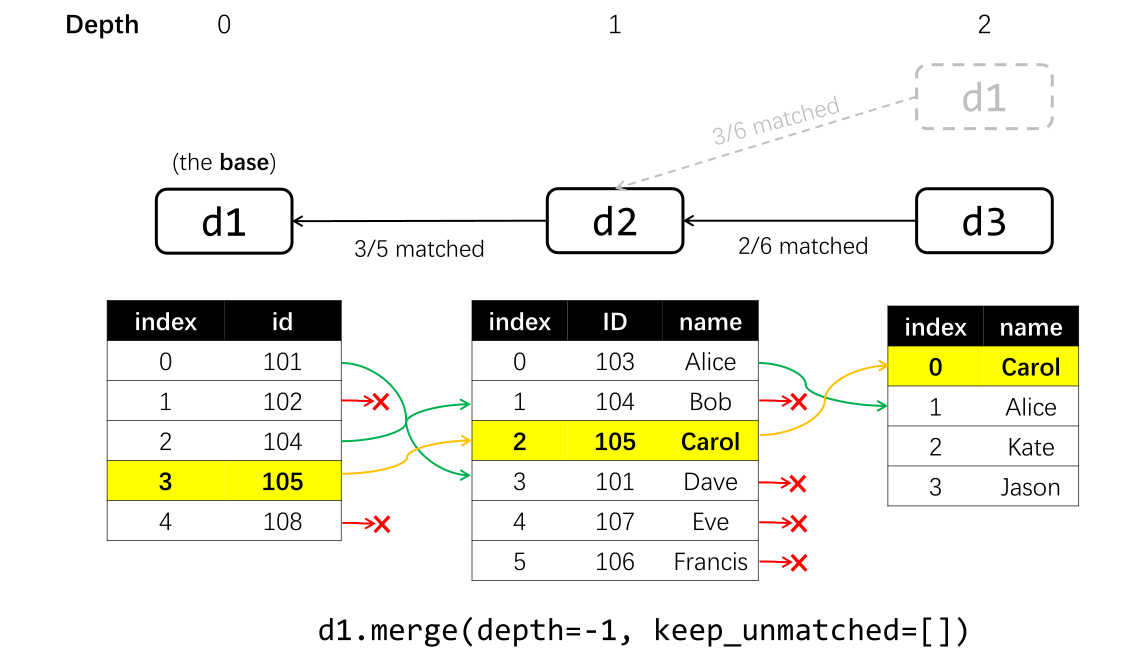
As seen in the results above, only one row is retained, as this is the only row that has corresponding rows
in all matched Data.
Keeping unmatched rows#
To retain the rows that do not have corresponding rows in specific Data objects, provide a list of Data names to the keep_unmatched argument:
d_merged = d1.merge(keep_unmatched=['d3'])
print('resulting Data:', d_merged)
d_merged.t
Names with parentheses are already matched, thus they are not expanded and will be ignored when merging.
---------------
d1
:   d2
:   :   d3
:   :   (d1)
---------------
[merge] entries with no match for d3 is kept.
[merge] merged: d1, d2, d3
resulting Data: <Data '(d1).MATCH(d2, d3)'>
| index_d1 | id | index_d2 | ID | name_d2 | index_d3 | name_d3 |
|---|---|---|---|---|---|---|
| int64 | int64 | int64 | int64 | str7 | int64 | str5 |
| 0 | 101 | 3 | 101 | Dave | -- | -- |
| 2 | 104 | 1 | 104 | Bob | -- | -- |
| 3 | 105 | 2 | 105 | Carol | 0 | Carol |
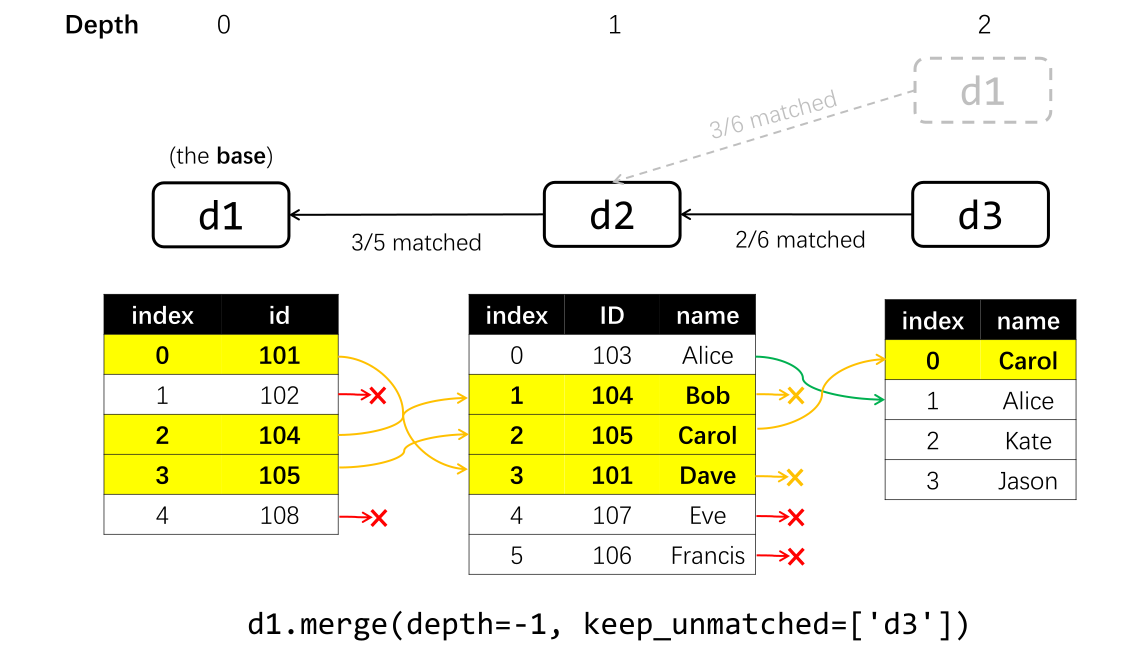
In this case, even if there is no corresponding row in 'd3', the row is retained, with the columns from 'd3' masked as missing values.
To set keep_unmatched to include all Data objects except the base data, set keep_unmatched=True.
However, keep_unmatched cannot include the base data or any Data that serves as an intermediary (i.e., a Data object that has both chilren and a parent) in the matching process (e.g., d2 in this case, which is between d1 and d3).
d1.merge(keep_unmatched=True)
[merge] `keep_unmatched` set to all data matched to <Data 'd1'>: ['d2', 'd3']
Names with parentheses are already matched, thus they are not expanded and will be ignored when merging.
---------------
d1
:   d2
:   :   d3
:   :   (d1)
---------------
---------------------------------------------------------------------------
MergeError                                Traceback (most recent call last)
Cell In[4], line 1
----> 1 d1.merge(keep_unmatched=True)

File ~/checkouts/readthedocs.org/user_builds/pyttop/envs/stable/lib/python3.10/site-packages/pyttop/table/table.py:1203, in Data.merge(self, depth, keep_unmatched, merge_columns, ignore_columns, innames, outname, keep_subsets, matchinfo_subset, verbose)
   1200     if matchinfo.data1.name in keep_unmatched and matchinfo.has_child:
   1201         msg = (f"cannot include data '{matchinfo.data1.name}' in `keep_unmatched`, "
   1202         f"because {matchinfo.has_child} is/are matched through the intermediary '{matchinfo.data1.name}'")
-> 1203         raise MergeError(msg)
   1205 ## get matched indices and handle metadata
   1206 for matchinfo in merged_matchinfo:

MergeError: cannot include data 'd2' in `keep_unmatched`, because ['d3'] is/are matched through the intermediary 'd2'
Note
In the tree matching framework, the merging process is based on the base data, and it is not possible to find rows that exist in its child data but not in the base data.
Additionally, it is impossible to keep the instances that are missing in a data table that serves as an intermediary. In the above example, consider the possibility when one instance (a person) is present in both d1 and d3 but not d2. For example, Kate’s ID might be 102, so d1[1] might correspond to the same person as d3[2]. By matching d3 with d1 indirectly through d2 (i.e., d1<-d2<-d3), you implicity require the instance to be present in d2. As a result, corresponding rows in d1 and d3 cannot be found unless they are also present in d2. See here for more discussions.
However, if we use d2 as the base, we can set keep_unmatched=True:
d_merged = d2.merge(keep_unmatched=True)
print('resulting Data:', d_merged)
d_merged.t
[merge] `keep_unmatched` set to all data matched to <Data 'd2'>: ['d3', 'd1']
Names with parentheses are already matched, thus they are not expanded and will be ignored when merging.
---------------
d2
:   d3
:   d1
:   :   (d2)
---------------
[merge] entries with no match for d3 is kept.
[merge] entries with no match for d1 is kept.
[merge] merged: d2, d3, d1
resulting Data: <Data '(d2).MATCH(d3, d1)'>
| index_d2 | ID | name_d2 | index_d3 | name_d3 | index_d1 | id |
|---|---|---|---|---|---|---|
| int64 | int64 | str7 | int64 | str5 | int64 | int64 |
| 0 | 103 | Alice | 1 | Alice | -- | -- |
| 1 | 104 | Bob | -- | -- | 2 | 104 |
| 2 | 105 | Carol | 0 | Carol | 3 | 105 |
| 3 | 101 | Dave | -- | -- | 0 | 101 |
| 4 | 107 | Eve | -- | -- | -- | -- |
| 5 | 106 | Francis | -- | -- | -- | -- |
Setting the depth#
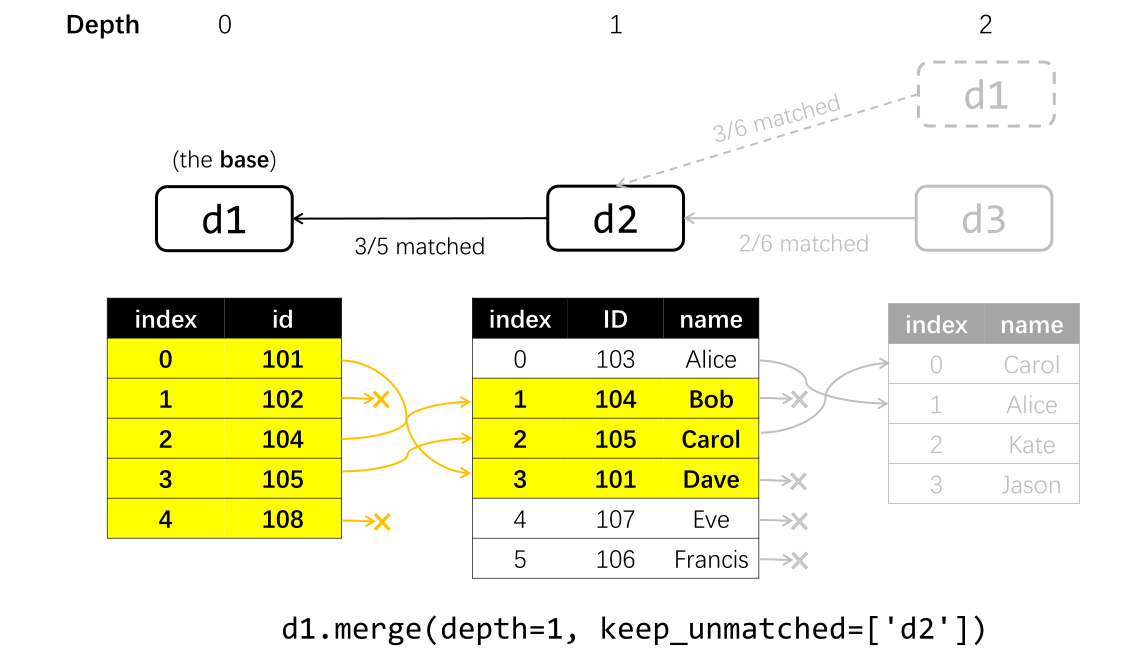
Similar to the depth for match_tree(), one can limit the depth of matching:
d_merged = d1.merge(depth=1, keep_unmatched=['d2'])
print('resulting Data:', d_merged)
d_merged.t
Names with parentheses are already matched, thus they are not expanded and will be ignored when merging.
---------------
d1
:   d2
---------------
[merge] entries with no match for d2 is kept.
[merge] merged: d1, d2
resulting Data: <Data '(d1).MATCH(d2)'>
| index_d1 | id | index_d2 | ID | name |
|---|---|---|---|---|
| int64 | int64 | int64 | int64 | str7 |
| 0 | 101 | 3 | 101 | Dave |
| 1 | 102 | -- | -- | -- |
| 2 | 104 | 1 | 104 | Bob |
| 3 | 105 | 2 | 105 | Carol |
| 4 | 108 | -- | -- | -- |
Additional merging options#
The name for the output Data. By default, the name of the resulting Data is automatically generated. You can directly specify it by setting the outname argument:
d1.merge(outname='merged_data', verbose=False) # verbose=False suppresses the printed information
<Data 'merged_data'>
Columns to be merged/ignored. To only merge (i.e., include in the resulting table) specific columns in specific Data tables, or to ignore (i.e., do not merge) specific columns, use the following:
d1.merge(
    merge_columns={
        'd2': ['index', 'name'], # for data 'd2': only merge columns named 'index', 'name'
        },
    ignore_columns={
        'd3': ['index'], # for data 'd3': do not merge column named 'index'
        },
    )
Keeping subsets. As of version 0.4.x, subsets of Data are not merged by default. To merge the subsets as well, set the keep_subsets argument to True:
d1.merge(keep_subsets=True)
Saving matching information as subsets. In the resulting Data, PyTTOP can create subsets that indicate whether a row has a corresponding row in certain Data objects by setting the matchinfo_subset argument to True. This feature is only useful when keep_unmatched != []; otherwise, only rows that have corresponding entries in all Data objects are retained.
d_merged = d1.merge(keep_unmatched=['d3'], matchinfo_subset=True)
d_merged.t
Names with parentheses are already matched, thus they are not expanded and will be ignored when merging.
---------------
d1
:   d2
:   :   d3
:   :   (d1)
---------------
[merge] entries with no match for d3 is kept.
[merge] merged: d1, d2, d3
| index_d1 | id | index_d2 | ID | name_d2 | index_d3 | name_d3 |
|---|---|---|---|---|---|---|
| int64 | int64 | int64 | int64 | str7 | int64 | str5 |
| 0 | 101 | 3 | 101 | Dave | -- | -- |
| 2 | 104 | 1 | 104 | Bob | -- | -- |
| 3 | 105 | 2 | 105 | Carol | 0 | Carol |
d_merged.subset_summary()
| group | name | size | fraction | expression | label |
|---|---|---|---|---|---|
| str10 | str3 | int64 | float64 | str42 | str33 |
| $unmasked | - | -1 | nan | <special subsets: item in col unmasked> | - |
| $eval | - | -1 | nan | <special subsets: rows satisfy expression> | - |
| default | all | 3 | 1.0 | all | All |
| matched/d1 | d3 | 1 | 0.3333333333333333 | <'d3' matched when merging to 'd1'> | 'd3' matched when merging to 'd1' |
d_merged.get_subsets('matched/d1/d3').selection # the `selection` property is a boolean array indicating whether each row is included in this subset
array([False, False, True])
As shown, there is a subset named 'd3' in the group 'matched/d1', which includes only the last row. This indicates that only the last row in d_merged has a correponding entry from d3.