A quickstart example#
This tutorial demonstrates the basic steps and workflows for using PyTTOP in your project. It serves as a solid starting point and reference guide to help you understand its usage. For more detailed information, you can explore the documentation on specific topics.
Loading Data#
The main class used to store tabular data in PyTTOP is Data. Let us first import it:
from pyttop.table import Data
PyTTOP includes example datasets for testing and exploring its features. Let us start by loading an example table called ‘LGM.bio’, which contains the biological properties of the fictional “little green men” (LGM).
from pyttop import get_example
lgm_bio = get_example('LGM.bio')
lgm_bio
<Data 'LGM.bio'>
Note
The “LGM” datasets are randomly generated solely for testing and demonstration purposes, with no real meaning. Please do not interpret them seriously.
As seen, the resulting lgm_bio is as Data object named ‘LGM.bio’. In most cases, you may want to load data from a file, which can be done with:
my_data = Data('path/to/data/file', name='my_data')
See the documentation here for details.
Now, we can take a look at the table we have:
lgm_bio.t
| id | sex | age | height | weight |
|---|---|---|---|---|
| int64 | str7 | int64 | float64 | float64 |
| 4982 | Both | 152 | 5.285876685178171 | 47.21641862351436 |
| 3638 | Both | -99 | 4.871718461858681 | 49.0944637256166 |
| 3857 | Female | 121 | 5.978068021500273 | 59.4423357404272 |
| 2499 | Female | 81 | 3.872845897766179 | 36.21057288026628 |
| 1938 | Female | 57 | 4.1134717034846275 | 41.66593964783728 |
| 1298 | Male | 114 | 5.816001078353533 | 57.820407142885564 |
| ... | ... | ... | ... | ... |
| 4176 | Both | 224 | 5.83569589806094 | 47.2038049736114 |
| 773 | Male | 79 | 5.13437852352276 | 52.56579589030932 |
| 831 | Neither | 51 | 5.469546410486544 | 59.79200427757866 |
| 4569 | N/A | 12 | 4.678570862408104 | 53.360488208662126 |
| 1000 | Neither | 136 | 4.603132905272983 | 40.11667243713672 |
| 4158 | Female | 186 | 7.371046528568509 | 71.33472061653602 |
Data preprocessing#
It appears that the table contains some missing values, such as -99 in the ‘age’ column. To exclude these values from calculations, plots, and other analyses, we can mask them using the mask_missing() method (see here for details):
lgm_bio.mask_missing(missval=-99)
[mask missing] col 'id': 0/5000 (0.00%) masked (value: -99).
[mask missing] col 'sex': 0/5000 (0.00%) masked (value: -99).
[mask missing] col 'age': 625/5000 (12.50%) masked (value: -99).
[mask missing] col 'height': 0/5000 (0.00%) masked (value: -99).
[mask missing] col 'weight': 0/5000 (0.00%) masked (value: -99).
The output shows that 625 out of 5000 values in the ‘age’ column are missing, while the other columns do not contain -99. However, the 'N/A' entries in the ‘sex’ column also appear to represent missing values. We can mask 'N/A' specifically in the ‘sex’ column as follows:
lgm_bio.mask_missing(['sex'], missval='N/A')
[mask missing] col 'sex': 714/5000 (14.28%) masked (value: N/A).
Now let us check how the above steps take effect:
lgm_bio.t
| id | sex | age | height | weight |
|---|---|---|---|---|
| int64 | str7 | int64 | float64 | float64 |
| 4982 | Both | 152 | 5.285876685178171 | 47.21641862351436 |
| 3638 | Both | -- | 4.871718461858681 | 49.0944637256166 |
| 3857 | Female | 121 | 5.978068021500273 | 59.4423357404272 |
| 2499 | Female | 81 | 3.872845897766179 | 36.21057288026628 |
| 1938 | Female | 57 | 4.1134717034846275 | 41.66593964783728 |
| 1298 | Male | 114 | 5.816001078353533 | 57.820407142885564 |
| ... | ... | ... | ... | ... |
| 4176 | Both | 224 | 5.83569589806094 | 47.2038049736114 |
| 773 | Male | 79 | 5.13437852352276 | 52.56579589030932 |
| 831 | Neither | 51 | 5.469546410486544 | 59.79200427757866 |
| 4569 | -- | 12 | 4.678570862408104 | 53.360488208662126 |
| 1000 | Neither | 136 | 4.603132905272983 | 40.11667243713672 |
| 4158 | Female | 186 | 7.371046528568509 | 71.33472061653602 |
We can make more operations on the tables, as introduced here.
Warning
This step should be done before any subset is defined (in the Defining subsets section). This is due to the static nature of susbets (see discussions here).
Matching and merging data#
It is common for the information of interest to be recorded in several separate tables, such as when different properties are obtained from different surveys. Let us load more example tables about LGM:
lgm_addr = get_example('LGM.addr')
lgm_name = get_example('LGM.name')
lgm_house = get_example('LGM.house')
lgm_addr, lgm_name, lgm_house
(<Data 'LGM.addr'>, <Data 'LGM.name'>, <Data 'LGM.house'>)
'LGM.addr' contains the addresses, described by longitude called 'ra' and latitude called 'dec':
lgm_addr.t
| id | ra | dec |
|---|---|---|
| int64 | float64 | float64 |
| 4982 | 136.0854386410856 | 86.1501075643242 |
| 3638 | 90.45487825432775 | 26.68961090066547 |
| 3857 | 327.2846655844139 | -35.76782461457626 |
| 2499 | 357.1661362826631 | 59.75263306402611 |
| 1938 | 258.0935565368864 | 43.62751110462609 |
| 1298 | 288.1021019923507 | -18.0319889117823 |
| ... | ... | ... |
| 4176 | 351.4056404985322 | 5.242588496591069 |
| 773 | 172.39697961657959 | -13.027380226082531 |
| 831 | 44.46225264213912 | -64.93410115013465 |
| 4569 | 140.74582101419014 | 11.24210612306192 |
| 1000 | 101.24854807472687 | 3.9419081639703397 |
| 4158 | 129.306401715813 | 23.739275822120526 |
'LGM.name' contains the names of LGM:
lgm_name.t
| id | surname |
|---|---|
| int64 | str10 |
| 2885 | Patterson |
| 1885 | Sanchez |
| 2814 | Parker |
| 3571 | Bryant |
| 1537 | Jackson |
| 2006 | Wright |
| ... | ... |
| 1353 | Stewart |
| 835 | Washington |
| 4117 | Knight |
| 3638 | Parker |
| 1168 | Perkins |
| 29 | Scott |
and 'LGM.house' contains information about the houses at each location:
lgm_house.t
| ra | dec | area |
|---|---|---|
| float64 | float64 | float64 |
| 136.0854386410856 | 86.1501075643242 | 30.12559414147148 |
| 90.45487825432775 | 26.68961090066547 | 22.588093897628738 |
| 327.2846655844139 | -35.76782461457626 | 24.700022953216845 |
| 357.1661362826631 | 59.75263306402611 | 26.007538891355942 |
| 258.0935565368864 | 43.62751110462609 | 24.77640003628158 |
| 288.1021019923507 | -18.0319889117823 | 21.509310818316457 |
| ... | ... | ... |
| 351.4056404985322 | 5.242588496591069 | 19.203126237682365 |
| 172.39697961657959 | -13.027380226082531 | 22.044461226220715 |
| 44.46225264213912 | -64.93410115013465 | 26.968278557675564 |
| 140.74582101419014 | 11.24210612306192 | 23.402062063352645 |
| 101.24854807472687 | 3.9419081639703397 | 18.977101898408353 |
| 129.306401715813 | 23.739275822120526 | 22.908667591094602 |
To analyze our data, we may need to match rows that represent the same instance and merge all the table mentioned above (lgm_bio, lgm_addr, lgm_name, lgm_house). To match tables, we first need to import the appropriate “matchers”:
from pyttop.matcher import ExactMatcher, SkyMatcher
Note that lgm_bio, lgm_addr, and lgm_name all contain the “id” column, so we can use the ExactMatcherto match rows where the “id” values are exactly the same.
lgm_bio.match(lgm_name, ExactMatcher('id', 'id')) # `'id', 'id'` are colmun names for `lgm_bio` and `lgm_name`, respectively.
lgm_bio.match(lgm_addr, ExactMatcher('id')); # if the two column names are the same
[match] "LGM.name" matched to "LGM.bio": 3500/5000 matched.
[match] "LGM.addr" matched to "LGM.bio": 5000/5000 matched.
As shown in the output, all 5000 rows in "lGM.bio" have matching rows in "LGM.addr", but only 3500 of them have matches in "LGM.name". In other words, 1500 “id” values in "lGM.bio" do not have corresponding entries in "LGM.name".
To merge the "LGM.house" table, we can match it with "LGM.addr" based on the longitude and latitude coordinates (ra, dec), using SkyMatcher, since the "LGM.house" table does not contain the “id” column.
lgm_addr.match(lgm_house, SkyMatcher());
[SkyMatcher] Data LGM.addr: found RA name 'ra' and Dec name 'dec'.
[SkyMatcher] Data LGM.house: found RA name 'ra' and Dec name 'dec'.
[match] "LGM.house" matched to "LGM.addr": 5000/5000 matched.
In this case, the ‘ra’ and ‘dec’ columns are automatically detected. Since (ra, dec) may contain errors, entries with the closest positions and distances smaller than a threshold (defaulting to 1 arcsec) are matched. We can also explicitly specify the RA and Dec column names and the threshold thres:
lgm_house.match(lgm_addr, SkyMatcher(thres=1, coord='ra-dec', coord1='ra-dec'));
[match] "LGM.addr" matched to "LGM.house": 5000/5000 matched.
Caution
In astronomy, RA can be expressed in hours. If the RA column does not have units (e.g. data.t['RA'].unit), SkyMatcher assumes the values are in degrees. You may need to specify the units as described here. Failing to do so can lead to incorrect matching results, which may not be immediately apparent.
Tip
By matching using data.match(data1, <...>), we try to find one best matching row (if any) in data1 for each row in data. This implies differences between lgm_addr.match(lgm_house, <...>) and lgm_house.match(lgm_addr, <...>)when , e.g., some instances are included in one table but not in the other table. For more details, see the matching documentation.
For simplicity, we will refer to data.match(data1, <...>) as “data1 matched to data”.
We can check how tables are matched to "lGM.bio", either directly or through intermediate tables, using the match_tree() method:
lgm_bio.match_tree()
Names with parentheses are already matched, thus they are not expanded and will be ignored when merging.
---------------
LGM.bio [base]
:   LGM.name [ExactMatcher("id", "id")]
:   LGM.addr [ExactMatcher("id", "id")]
:   :   LGM.house [<SkyMatcher with thres=1>]
:   :   :   (LGM.addr) [<SkyMatcher with thres=1>]
---------------
As shown, two datasets, "LGM.name" and "LGM.addr", are matched directly to our base data, "lGM.bio", using the ExactMatcher. "LGM.house" is matched to "LGM.addr" and can thus be merged as well. Although "LGM.addr" is also matched to "LGM.house", since we already have "LGM.addr", we do not need to count it again.
We can now merge all these tables using the merge() method:
lgm = lgm_bio.merge() # `lgm` is the merged dataset
lgm.t
Names with parentheses are already matched, thus they are not expanded and will be ignored when merging.
---------------
LGM.bio
:   LGM.name
:   LGM.addr
:   :   LGM.house
:   :   :   (LGM.addr)
---------------
[merge] merged: LGM.bio, LGM.name, LGM.addr, LGM.house
| id_LGM.bio | sex | age | height | weight | id_LGM.name | surname | id_LGM.addr | ra_LGM.addr | dec_LGM.addr | ra_LGM.house | dec_LGM.house | area |
|---|---|---|---|---|---|---|---|---|---|---|---|---|
| int64 | str7 | int64 | float64 | float64 | int64 | str10 | int64 | float64 | float64 | float64 | float64 | float64 |
| 4982 | Both | 152 | 5.285876685178171 | 47.21641862351436 | 4982 | Johnston | 4982 | 136.0854386410856 | 86.1501075643242 | 136.0854386410856 | 86.1501075643242 | 30.12559414147148 |
| 3638 | Both | -- | 4.871718461858681 | 49.0944637256166 | 3638 | Parker | 3638 | 90.45487825432775 | 26.68961090066547 | 90.45487825432775 | 26.68961090066547 | 22.588093897628738 |
| 2499 | Female | 81 | 3.872845897766179 | 36.21057288026628 | 2499 | Hughes | 2499 | 357.1661362826631 | 59.75263306402611 | 357.1661362826631 | 59.75263306402611 | 26.007538891355942 |
| 1938 | Female | 57 | 4.1134717034846275 | 41.66593964783728 | 1938 | Richardson | 1938 | 258.0935565368864 | 43.62751110462609 | 258.0935565368864 | 43.62751110462609 | 24.77640003628158 |
| 1298 | Male | 114 | 5.816001078353533 | 57.820407142885564 | 1298 | Adams | 1298 | 288.1021019923507 | -18.0319889117823 | 288.1021019923507 | -18.0319889117823 | 21.509310818316457 |
| 2788 | -- | 160 | 4.940093837899926 | 42.131509571914805 | 2788 | Simmons | 2788 | 184.6162228323339 | 28.355354989748907 | 184.6162228323339 | 28.355354989748907 | 22.782082185683507 |
| ... | ... | ... | ... | ... | ... | ... | ... | ... | ... | ... | ... | ... |
| 4366 | Neither | -- | 5.740004480141956 | 66.01787750568623 | 4366 | Alvarez | 4366 | 2.843122795075148 | 67.18538172339406 | 2.843122795075148 | 67.18538172339406 | 27.44336793418737 |
| 773 | Male | 79 | 5.13437852352276 | 52.56579589030932 | 773 | Knight | 773 | 172.39697961657959 | -13.027380226082531 | 172.39697961657959 | -13.027380226082531 | 22.044461226220715 |
| 831 | Neither | 51 | 5.469546410486544 | 59.79200427757866 | 831 | Cameron | 831 | 44.46225264213912 | -64.93410115013465 | 44.46225264213912 | -64.93410115013465 | 26.968278557675564 |
| 4569 | -- | 12 | 4.678570862408104 | 53.360488208662126 | 4569 | Cameron | 4569 | 140.74582101419014 | 11.24210612306192 | 140.74582101419014 | 11.24210612306192 | 23.402062063352645 |
| 1000 | Neither | 136 | 4.603132905272983 | 40.11667243713672 | 1000 | Knight | 1000 | 101.24854807472687 | 3.9419081639703397 | 101.24854807472687 | 3.9419081639703397 | 18.977101898408353 |
| 4158 | Female | 186 | 7.371046528568509 | 71.33472061653602 | 4158 | Cooper | 4158 | 129.306401715813 | 23.739275822120526 | 129.306401715813 | 23.739275822120526 | 22.908667591094602 |
The resulting table includes only 3500 rows, as only 3500 out of 5000 were matched when matching "LGM.name" to "LGM.bio". However, we may want to retain rows without "LGM.name" information. Also, the resulting table appears redundant as, e.g., it includes the “id” column from three datasets: 'id_LGM.bio', 'id_LGM.name', and 'id_LGM.addr'. We can control which columns should be ignored or merged. To achieve this, we can make some adjustments to the code:
lgm = lgm_bio.merge(
    keep_unmatched=['LGM.name'], # set it to True to keep unmatched rows for all tables
    merge_columns={
        'LGM.name': ['surname'], # only merges this column
    },
    ignore_columns={
        'LGM.addr': ['id'],
        'LGM.house': ['ra', 'dec'], # do not merge these columns
    },
)
lgm.t
Names with parentheses are already matched, thus they are not expanded and will be ignored when merging.
---------------
LGM.bio
:   LGM.name
:   LGM.addr
:   :   LGM.house
:   :   :   (LGM.addr)
---------------
[merge] entries with no match for LGM.name is kept.
[merge] merged: LGM.bio, LGM.name, LGM.addr, LGM.house
| id | sex | age | height | weight | surname | ra | dec | area |
|---|---|---|---|---|---|---|---|---|
| int64 | str7 | int64 | float64 | float64 | str10 | float64 | float64 | float64 |
| 4982 | Both | 152 | 5.285876685178171 | 47.21641862351436 | Johnston | 136.0854386410856 | 86.1501075643242 | 30.12559414147148 |
| 3638 | Both | -- | 4.871718461858681 | 49.0944637256166 | Parker | 90.45487825432775 | 26.68961090066547 | 22.588093897628738 |
| 3857 | Female | 121 | 5.978068021500273 | 59.4423357404272 | -- | 327.2846655844139 | -35.76782461457626 | 24.700022953216845 |
| 2499 | Female | 81 | 3.872845897766179 | 36.21057288026628 | Hughes | 357.1661362826631 | 59.75263306402611 | 26.007538891355942 |
| 1938 | Female | 57 | 4.1134717034846275 | 41.66593964783728 | Richardson | 258.0935565368864 | 43.62751110462609 | 24.77640003628158 |
| 1298 | Male | 114 | 5.816001078353533 | 57.820407142885564 | Adams | 288.1021019923507 | -18.0319889117823 | 21.509310818316457 |
| ... | ... | ... | ... | ... | ... | ... | ... | ... |
| 4176 | Both | 224 | 5.83569589806094 | 47.2038049736114 | -- | 351.4056404985322 | 5.242588496591069 | 19.203126237682365 |
| 773 | Male | 79 | 5.13437852352276 | 52.56579589030932 | Knight | 172.39697961657959 | -13.027380226082531 | 22.044461226220715 |
| 831 | Neither | 51 | 5.469546410486544 | 59.79200427757866 | Cameron | 44.46225264213912 | -64.93410115013465 | 26.968278557675564 |
| 4569 | -- | 12 | 4.678570862408104 | 53.360488208662126 | Cameron | 140.74582101419014 | 11.24210612306192 | 23.402062063352645 |
| 1000 | Neither | 136 | 4.603132905272983 | 40.11667243713672 | Knight | 101.24854807472687 | 3.9419081639703397 | 18.977101898408353 |
| 4158 | Female | 186 | 7.371046528568509 | 71.33472061653602 | Cooper | 129.306401715813 | 23.739275822120526 | 22.908667591094602 |
As seen, those without match for “surname” are masked.
Now with our combined dataset, we are ready to analyze it.
Defining subsets#
It is common to be interested in subsets of a dataset. For example, we might want to know how many of the “little green men” have the surname “Smith”. So let us import Subset and add a subset:
from pyttop.table import Subset

smith = lgm.add_subsets(
    Subset.by_value('surname', 'Smith'), # Defines a subset for rows where the 'surname' column is 'Smith'
    )
smith
<Subset 'surname=Smith' of Data '(LGM.bio).MATCH(LGM.name, LGM.addr, LGM.house)' (47/5000)>
As shown in the output, 47 out of 5000 entries have the surname “Smith”.
We may also want to study potential systematic differences between sexes. To do so, let us create a “subset group” for the different sexes:
lgm.subset_group_from_values('sex')
lgm.get_subsets(name=['sex=Male', 'sex=Female'])
[subset] Found subset 'sex=Male' in group 'sex'.
[subset] Found subset 'sex=Female' in group 'sex'.
[<Subset 'sex=Male' of Data '(LGM.bio).MATCH(LGM.name, LGM.addr, LGM.house)' (1036/5000)>,
 <Subset 'sex=Female' of Data '(LGM.bio).MATCH(LGM.name, LGM.addr, LGM.house)' (1031/5000)>]
Here are all subsets we have:
lgm.subset_summary()
| group | name | size | fraction | expression | label |
|---|---|---|---|---|---|
| str9 | str13 | int64 | float64 | str42 | str7 |
| $unmasked | - | -1 | nan | <special subsets: item in col unmasked> | - |
| $eval | - | -1 | nan | <special subsets: rows satisfy expression> | - |
| default | all | 5000 | 1.0 | all | All |
| default | surname=Smith | 47 | 0.0094 | surname=Smith | Smith |
| sex | sex=Both | 1096 | 0.2192 | sex=Both | Both |
| sex | sex=Female | 1031 | 0.2062 | sex=Female | Female |
| sex | sex=Male | 1036 | 0.2072 | sex=Male | Male |
| sex | sex=Neither | 1123 | 0.2246 | sex=Neither | Neither |
There are more ways to define and use subsets. See the subset documentation for details.
Making plots#
To quicky explore the patterns in our data, it is a good idea to create some plots.
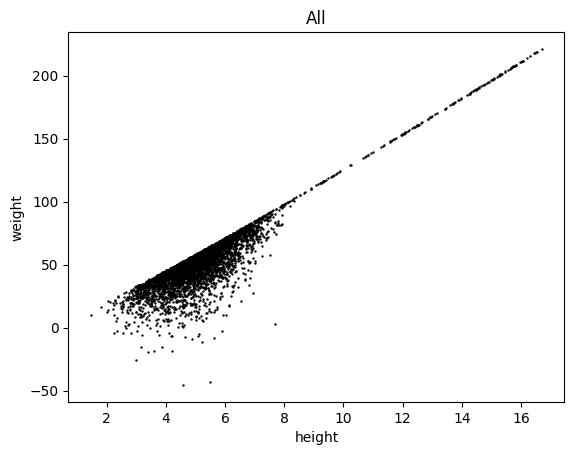
Let us begin by plotting weight versus height for all entries:
lgm.scatter('height', 'weight', c='k', s=.5, subsets='all')
(<Figure size 640x480 with 1 Axes>,
 <Axes: title={'center': 'All'}, xlabel='height', ylabel='weight'>)
Is there any differences between sexes?
lgm.scatter('height', 'weight', s=.5,
    group='sex',
    )
(<Figure size 640x480 with 1 Axes>, <Axes: xlabel='height', ylabel='weight'>)
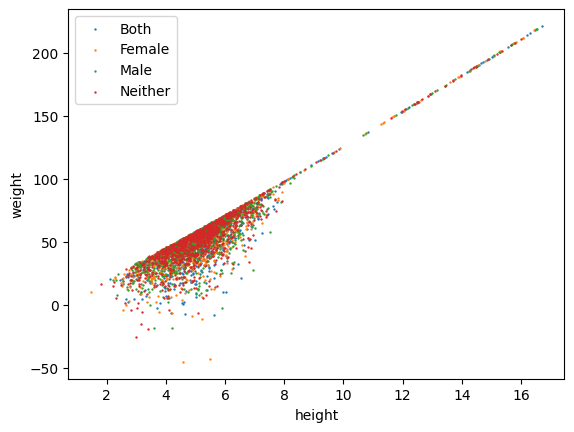
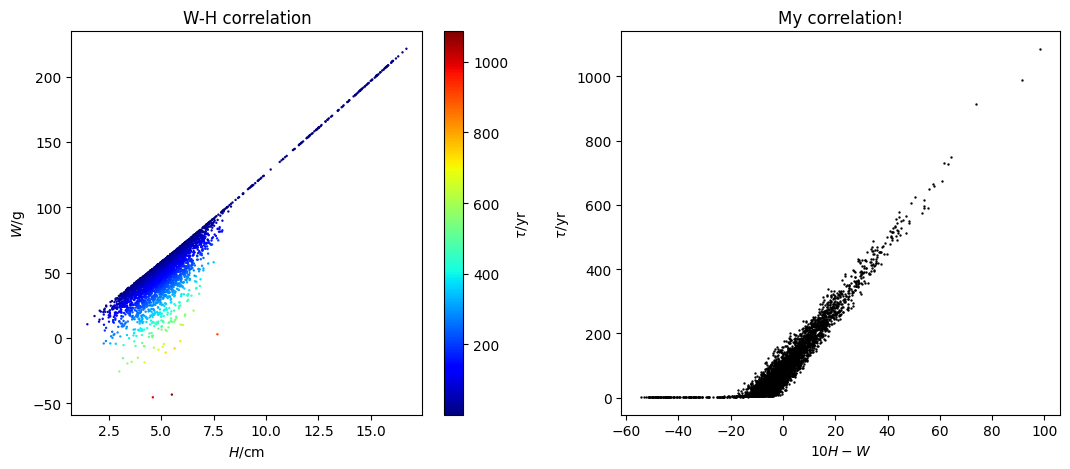
It seems there is no sexual dependance for height and weight. Then, can there be a dependance on age? We can color-code the markers by age:
lgm.scatter('height', 'weight', s=.5, c='age', cmap='jet', subsets='all')
(<Figure size 640x480 with 2 Axes>,
 <Axes: title={'center': 'All'}, xlabel='height', ylabel='weight'>)
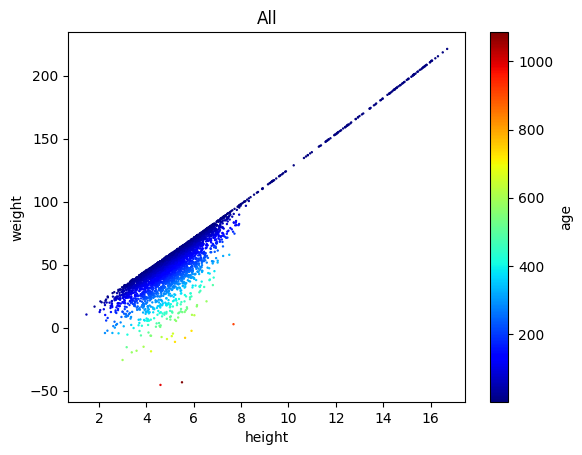
Great, so their weight at a given height is determined by the age.
By the way, we can change lgm.scatter() to lgm.plots() for more general usage (see here for details):
lgm.plots(
    'scatter', # making a scatter plot
    cols=('height', 'weight'), # column 'weight' versus 'height'
    kwcols={'c': 'age'}, # color-coding: column 'age'
    s=.5, cmap='jet', # more scatter settings
    subsets='all', # plotting all rows
    )
(<Figure size 640x480 with 2 Axes>,
 <Axes: title={'center': 'All'}, xlabel='height', ylabel='weight'>)
It seems that the dependence on age can be better shown by the following correlation:
lgm.plots(
    'scatter', # making a scatter plot
    cols=('10*height - weight', 'age'), # 'age' versus 'weight - 10**height'
    eval=True, # we need to evaluate the above expression (since '10*height - weight' is not a column name)
    s=.5, # more scatter settings
    subsets='all', # plotting all rows
    )
(<Figure size 640x480 with 1 Axes>,
 <Axes: title={'center': 'All'}, xlabel='10*height - weight', ylabel='age'>)
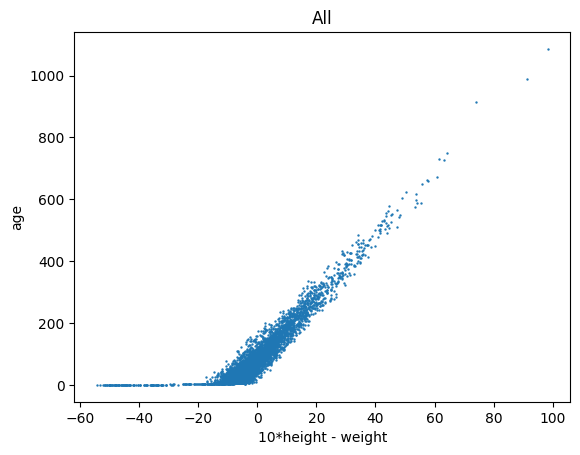
This appears to be a good correlation. So let us define a new quantity \(q\): \( q = W - 10H, \) where \(W\) denotes weight and \(H\) denotes height. We can calculate this and add it as a new column (see here for details):
lgm.eval('10*height - weight', to_col='q'); # evaluate '10*height - weight' and store it in the column 'q'
Great, let us report this in our new paper, On the Properties of the Little Green Men. However, we might want to set the labels more formally, rather than directly showing column names (see here for details):
lgm.set_labels(
    height=r'$H/\mathrm{cm}$',
    weight=r'$W/\mathrm{g}$',
    age=r'$\tau/\mathrm{yr}$',
    )
Now, with more control, we can further customize the plots (see here for details):
import matplotlib.pyplot as plt
fig, axes = plt.subplots(1, 2, figsize=(10.8, 4.8))

lgm.plots(
    'scatter', # making a scatter plot
    cols=('height', 'weight'), # column 'weight' versus 'height'
    kwcols={'c': 'age'}, # color-coding: column 'age'
    s=.5, cmap='jet', # more scatter settings
    subsets='all', # plotting all entries
    ax=axes[0], # plot it in the first axis
    )
lgm.plots(
    'scatter', # making a scatter plot
    cols=('10*height - weight', 'age'), # 'age' versus 'weight - 10**height'
    eval=True, # we need to evaluate the above expression ('10*height - weight' is not a column name)
    s=.5, c='k', # more scatter settings
    subsets='all', # plotting all entries
    ax=axes[1], # plot it in the second axis
    )

# manual adjustments
axes[0].set_title('W-H correlation')
axes[1].set_title('My correlation!')
axes[1].set_xlabel('$10H-W$')
plt.tight_layout()
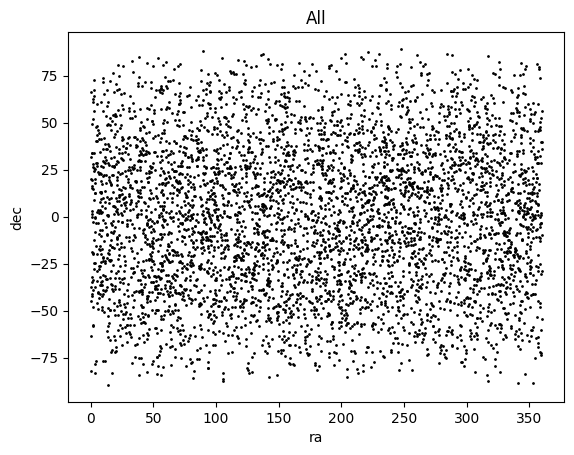
As another example, let us study the house information of the LGMs.
lgm.plots(
    'scatter',
    cols=('ra', 'dec'),
    s=1, c='k',
    subsets='all',
    )
(<Figure size 640x480 with 1 Axes>,
 <Axes: title={'center': 'All'}, xlabel='ra', ylabel='dec'>)
Suppose we are interested in the locations where LGMs with the surname “Smith” live:
lgm.plots(
    'scatter',
    cols=('ra', 'dec'),
    subsets=(~smith, smith), # `smith` is a subset defined eariler; `~smith` is its complementary set (not in `smith`)
    iter_kwargs={ # for the two subsets, `~smith` and `smith`, use two different settings
        's': [.5, 5],
        'c': ['gray', 'r'],
        'marker': ['.', '*'],
        },
    )
(<Figure size 640x480 with 1 Axes>, <Axes: xlabel='ra', ylabel='dec'>)
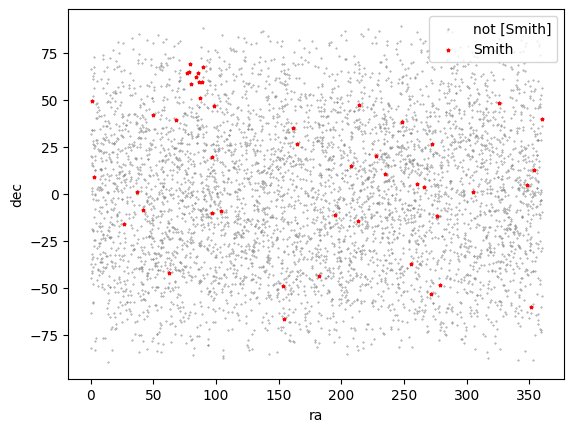
There appears to be a group of LGMs with the surname “Smith” living around ra = 80, dec = 60.
There are many more features of the plots() method. Check the documentation for details.
Saving and exporting data#
Now, we would like to save our merged dataset for later use. With the following code, we can save it to the lgm.data file, which can be loaded later by PyTTOP (see here for details).
# lgm.save('path/to/lgm.data')
To publish or share our dataset, we may also need to export it using a certain format (see here for more information):
# lgm.save('path/to/lgm.txt', format='ascii')